SKILLS 101

A Skill is a playbook ChatGPT can reuse.

If you have ever repeated the same instructions, pasted the same template, enforced the same standard or walked ChatGPT through the same multi-step job again and again, Skills are designed for exactly that kind of work.

A prompt asks for a result. A Skill can preserve the way of working.

A normal prompt lives in the conversation where you give it. You can certainly save prompts and reuse them, but the burden is still largely on you to bring the process back into the chat.

A Skill is designed as a reusable package. Its name and description help ChatGPT recognize when it is relevant, its core instructions define the workflow, and supporting resources can provide the examples, standards, schemas, templates or deterministic scripts that the job genuinely needs.

The important shift is consistency. Instead of hoping you remember the six things that make the task work properly, you package those six things into the Skill and make the workflow part of the tool.
WHAT CAN BE INSIDE ONE?

A Skill can be tiny — or surprisingly capable.

Not every Skill needs every component. Good architecture uses only what materially improves the job.

Name + Description

These help ChatGPT understand what the Skill does and when it is relevant.

SKILL.md

The main playbook: the workflow, rules, decision logic, required inputs, output expectations and quality checks.

References

Reusable background material such as brand standards, schemas, templates, examples or domain guidance that can be loaded when relevant.

Scripts

Optional deterministic code for jobs where repeatability or correctness matters more than asking the model to improvise the same mechanics every time.

Assets

Optional files used in finished outputs — for example templates, boilerplate resources, icons or other reusable product material.

WHERE SKILLS ARE USEFUL

Think repeatable jobs, not novelty demos.

Research Workflow

Use the same evidence standard, source hierarchy, analysis sequence and output structure every time you investigate a market or topic.

Client Process

Turn discovery notes into a consistent brief, gap analysis, recommendation or handoff document without rebuilding your method in every chat.

Brand & Writing System

Package tone, structure, editorial rules, examples and quality checks around recurring content work.

File Transformation

Read a supplied document or dataset, apply a known procedure, and produce a predictable report or normalized output.

Team Standard

Capture an internal checklist or SOP so team members can invoke the same approved process inside ChatGPT.

Commercial Product

Package a focused useful workflow for customers or clients, with onboarding, testing and support designed around how other people will actually use it.

HOW CHATGPT USES IT

Automatic when relevant. Explicit when you want control.

After a Skill is installed, ChatGPT can use it when the task matches. You can also explicitly select or @-mention the Skill when you want to make sure that workflow owns the job.

AUTO

Relevant work appears.

ChatGPT can recognize from the Skill's description that it applies to the current request and use it as part of the task.

EXPLICIT

You invoke it directly.

Select or @-mention the Skill and attach the real job in the same conversation when you want predictable ownership.

COMPOSE

Skills can work alongside tools and other workflows.

More advanced systems may combine Skills with scripts, connectors, files or other capabilities when the architecture actually requires them.

CURRENT OPENAI AVAILABILITY

Check your workspace before you build around Skills.

OpenAI currently lists Skills as available to eligible ChatGPT Business, Enterprise, Healthcare and Edu users, subject to workspace settings and product availability.

This matters because a membership, course or third-party Skill cannot switch the feature on for you. The safest check is your own interface.

INSTALLATION

The package normally arrives as skill.zip.

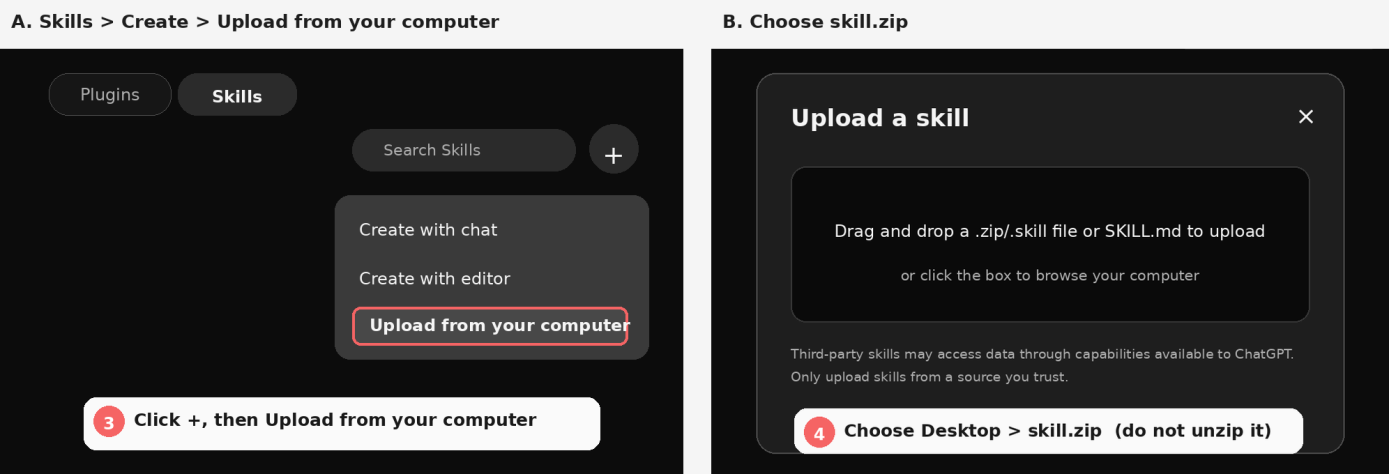
Keep the ZIP intact. In ChatGPT, open the Skills area, choose the upload option, select the supplied ZIP and wait for the platform's scan. Once the Skill appears under Installed, start a new conversation and either let ChatGPT use it when relevant or invoke it directly.

OpenAI can change labels and navigation, so always treat the live interface and current OpenAI Help Center as the final reference.

ChatGPT Skills upload illustration
You do not need to become a Skill engineer to own the idea.

This is where AgentSkillsFactory fits. Creator Core gives you a guided architecture and build system so you can describe the job, audience, source material and useful outcome while it handles fit, workflow design, Blueprint, construction, testing and packaging.

The membership then adds 50 Skill Starters, business-model playbooks, specialist workflows, testing, documentation, onboarding and commercial training around that core.

The point is not to hide how Skills work. The point is to let you learn enough to make good product decisions without forcing you to hand-engineer the internals before you can create something useful.